

.png)
Roster Management in Healthcare: A Practical Guide for Provider Teams

Rahul Shivkumar
September 28, 2026

Since the No Surprises Act (NSA) took effect in January 2022, keeping your provider directories accurate became federal law.
Imagine this: A major health insurance company gets a call from CMS requesting an audit of its provider directories. Within hours, their team discovers that 40% of their provider data is outdated. The phone numbers lead nowhere, and the addresses point to empty buildings.
The result? Massive penalty exposure, network disruption, and compliance issues that could have been prevented.
Inaccurate directories can trigger regulatory audits, hefty fines, and serious operational issues.
This guide provides a complete, practical NSA audit checklist for health plans, provider groups, and Management Services Organizations (MSOs). This checklist will help you prepare for and pass an NSA audit.
Incorrect directories lead to surprise medical bills for patients. In fact, Health Affairs conducted a survey of privately insured mental health patients. The study revealed that 44% of patients used a mental health provider directory, and 53% of them encountered provider inaccuracies. Even worse, those who encountered directory inaccuracies were four times more likely to receive a surprise outpatient out-of-network bill. Hence, there is a need for accurate directories.
The Centers for Medicare & Medicaid Services (CMS) has set clear expectations for provider directory accuracy under the NSA. Here's what you need to know:
The NSA includes specific provider directory requirements to ensure patients have access to accurate information about their healthcare providers.
These requirements are enforced by the CMS and apply to all providers and healthcare facilities participating in group or individual health plans.
Under the NSA, providers and health plans must:
The provider directory must include:
Providers and plans must maintain timestamped validation records and detailed change logs for every provider in their network to demonstrate compliance with these requirements.
Printed directories must also include the date of printing and a statement directing patients to the most current online version.
Research shows that 40% to 60% of provider directories contain inaccuracies at any given time. This means that more than half of your directory could be wrong right now.
Common problems include:
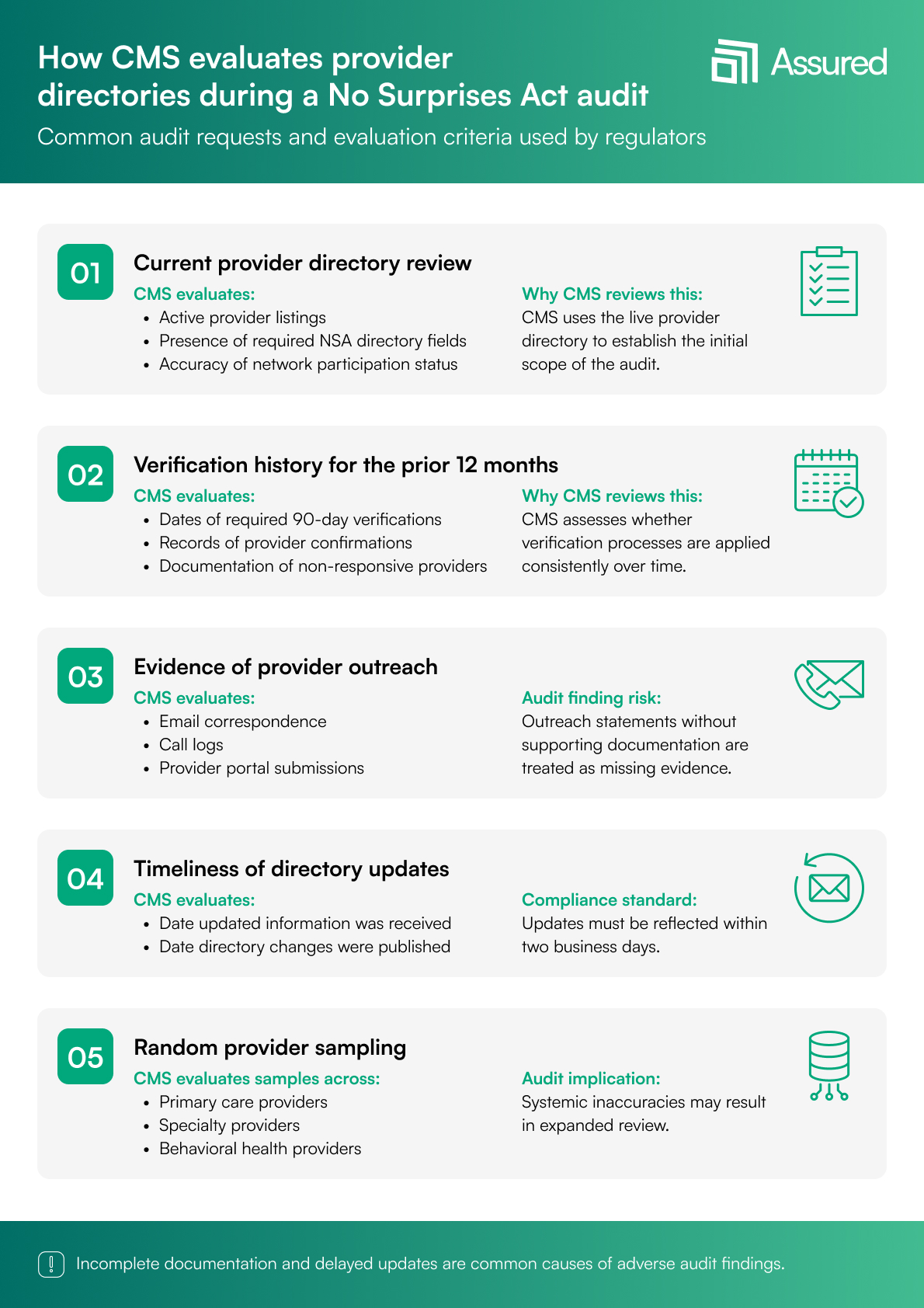
When CMS or state regulators come knocking, here's what they typically request:
Now let's get into the detailed checklist that will help you prepare for and pass an NSA audit. This is a practical, actionable guide you can start using today.
Start by listing every source of provider data in your organization. This includes CAQH ProView, the National Plan and Provider Enumeration System (NPPES), provider self-attestation forms, your electronic health records system, HR databases, and contracting systems.
Next, identify which data points each source controls. For example, CAQH might be your primary source for credentials and education, while your contracting database holds network participation details.
Check for conflicting data across these systems. If CAQH says Dr. Smith works at 123 Main Street, but your claims system shows 456 Oak Avenue, which one is right? More importantly, which one appears in your public directory?
Confirm whether you have a single source of truth, one system that serves as the master record for each data element. Without this, you're guaranteed to have inconsistencies.
Finally, ensure you have access to real-time updates from external sources such as the NPI registry. Provider licenses, sanctions, and other information can change daily.
This is where automated solutions like Assured unify data from CAQH, NPPES, payors, and credentialing files into unique provider profiles, removing conflicts and creating that single source of truth.
Document your 90-day verification policy in writing. Auditors will ask to see it. Your policy should clearly state how you track which providers need verification each cycle.
Define your outreach methods. Will you contact providers via email, phone, SMS, or through a provider portal? Most successful organizations use multiple channels to improve response rates.
Make sure you're capturing timestamps for every verification attempt and completion. A simple "verified" checkbox isn't enough. You need the date, time, method, and who performed the verification.
Most importantly, maintain evidence of provider confirmations. When Dr. Jones confirms her information is current, keep that email, portal submission, or call recording. This proof is your audit lifeline.
Automated platforms handle this by initiating verification cycles automatically, sending configurable reminders, and maintaining built-in proof-of-verification logs that auditors love.
Create an internal checklist for each category of required information:
Pre-built field validation rules and automated flags for missing or inconsistent information can catch these issues before they become audit problems.
Document how many times you attempt to reach each provider during verification. Set clear rules for days between attempts, and don't wait weeks between tries.
Create a process that ensures compliance with the 2-business-day update rule. When information comes in on Monday, it must be in directories by Wednesday, the close of business.
Establish a mechanism to track non-responsive providers. After three attempts with no response, what happens? Can you suspend their listing? Remove them from directories? Your policy needs to address this.
Build an escalation path for critical updates. If a provider suddenly closes their practice or loses their license, you need a fast-track process to update directories immediately.
Provider portals that allow easy self-service updates, combined with automated escalations for non-responsive providers and direct synchronization to directories after approval, can transform this process from a compliance burden to a smooth operation.
Measure exactly how long it takes to update provider data after receiving new information. Track this for different types of changes:
Compare your actual performance against the NSA's 2-business-day requirement. If you're consistently missing this deadline, you need to identify and fix the bottlenecks.
Real-time updates that flow automatically from provider submissions to published directories eliminate manual delays and ensure compliance with timing requirements.
Implement duplicate provider profile detection. Nothing fails an audit faster than having the same provider listed multiple times with different information.
Cross-check NPIs against practice locations to ensure providers are only listed where they actually practice. Use automated address validation through USPS or similar services to catch typos and formatting errors.
Run consistency checks across all systems. If your claims data shows Dr. Anderson hasn't seen patients at a location in six months, why is she still listed there in your directory?
Establish a clear error resolution workflow. When inconsistencies are found, who investigates? Who makes the final decision? How is the correction documented?
Maintain complete audit trails for every change. Auditors want to see not just what changed, but when, why, and who approved it.
Machine-learning tools can automatically detect duplicates, flag errors, and maintain comprehensive audit histories, reducing manual work while improving accuracy.
Count how many directories you maintain, whether in web, print, PDF, or mobile app. Each one needs to be accurate and synchronized.
Determine if publishing is automated or manual. Manual processes introduce delays and errors. Document your quality review process before each publish. Someone should verify a sample of changes before they go live.
Establish and document your refresh cycles. Weekly? Biweekly? Daily? Whatever your schedule, it must be consistent and documented.
Define clear data ownership roles. Who "owns" provider data in your organization? Who's responsible for accuracy? These roles must be documented and communicated.
Assign a compliance manager specifically for NSA requirements. This person should monitor regulatory updates and ensure your processes stay current.
Create service level agreements (SLAs) for responding to provider updates. For example: "All provider submissions receive initial review within 4 hours during business days."
Conduct annual training for credentialing and provider relations teams. Everyone touching provider data needs to understand NSA requirements.
Schedule internal audits quarterly, not just annually. Regular self-audits catch problems before regulators do.
Enterprise workflow automation libraries with role-based permissions help enforce governance policies consistently across your organization.
Understanding where others fail can help you succeed. Here are the most common problems we see:
Think of directory management as a journey through four levels:
Level 1: Manual and Reactive: You're using spreadsheets, conducting ad-hoc verifications, and missing audit trails. This is where most organizations start, but staying here guarantees audit failure.
Level 2: Partially Automated: You have some automation, but gaps remain. Verification cycles are inconsistent, and data conflicts persist between systems.
Level 3: Standardized and Proactive: You have defined workflows, conduct quarterly audits, and sync multiple systems regularly. This is the minimum for NSA compliance.
Level 4: Fully Automated and Audit-Ready: This is the gold standard. You have end-to-end automation, including automated 90-day verifications, centralized provider profiles, real-time change detection, complete audit logs, and automatic directory synchronization.
One way to achieve full automation for audit readiness is by using software like Assured. These tools automate the entire directory management process, keeping your directories accurate and preventing surprise bills or NSA non-compliance.
Assured is an AI-powered credentialing and payer enrollment software. The platform helps you with NSA compliance and transforms your directory management from a risk into a competitive advantage.
Here's exactly how each Assured feature works to protect you from NSA audit failures:
Assured automates the provider verification cycle, scheduling and tracking reverifications every 90 days. The system maintains a rolling calendar, sending reminders before the deadline and supporting multi-channel outreach (email, SMS, portal notifications) to ensure providers respond promptly.
If a provider does not respond, the system escalates with reminders and alerts provider relations teams, helping organizations prove outreach attempts and maintain compliance.
Providers can log in to update their information, upload documentation, and confirm accuracy digitally. The portal tracks all changes, maintains a history of verification actions, and ensures a complete audit trail with timestamps and digital signatures for every update.
Assured integrates with authoritative sources, including NPPES, CAQH, state licensing boards, and DEA databases, to synchronize provider data in real time. This ensures that directories reflect the most current information, reducing inconsistencies and manual errors.
The platform automates directory updates across all channels (web, mobile, print, partner feeds), ensuring that changes are published within the required 2-business-day window for NSA compliance.
Assured enforces role-based access, allowing different teams to manage only their respective areas (credentialing, network operations, compliance). Approval workflows are built for critical updates, and all changes are logged with detailed audit documentation, including before/after values and timestamps.
The platform offers dashboards that track compliance metrics, alert teams to approaching deadlines, and generate automated compliance reports for audits. Assured also regularly monitors provider data for accuracy and flags missing or inconsistent information.
Assured connects credentialing, enrollment, and directory management to ensure seamless data flow between processes. This reduces delays and errors, and supports automated updates for license renewals, credentialing, and network status changes.
Being "directory-ready" is an ongoing role that requires constant attention. Start by assessing your current directory state against this checklist. Identify your biggest gaps and address them.
Remember that automation can reduce your audit risk while freeing your team to focus on strategic administration and patient care rather than manual data management.
Assured can eliminate a majority of audit risks. But whether you automate or improve your manual processes, the important thing is to start now. Every day you wait increases your audit exposure. Book a demo to see how Assured can help you get audit-ready.
If your directory fails an NSA audit, it can result in monetary penalties, corrective action plans, increased oversight, and potential exclusion from federal programs. The severity depends on the extent of non-compliance.
Verification under NSA rules requires direct confirmation from the provider or their authorized representative that the information is current and accurate. Passive methods like claims analysis don't count.
There’s no specific frequency for auditing your provider directory. While NSA requires 90-day verifications, best practice is monthly internal audits with comprehensive quarterly reviews.
The mandatory fields for an NSA-compliant directory include: Name, NPI, addresses, phone numbers, accepting new patients status, specialties, plan participation, and affiliations are all required.
Both providers and payers must keep accurate directories. However, payers usually have broader networks, which require more complex verification processes, while provider groups have more direct control over their provider information.
Automation reduces directory errors by ensuring consistent verification schedules, maintaining complete audit trails, and enabling real-time updates that would be impossible to achieve manually.

Assured Health, Inc.
333 Seventh Ave, Suite 1701
New York, NY 10001



.jpeg)