
PECOS lookup by NPI, provider, or organization |
Medicare Provider Verification Tool
Search public Medicare enrollment-related records to see whether a provider, supplier, facility, or organization appears in PECOS-related data.
Dr. Sarah Elizabeth Johnson
- PECOS Enrolled
Personal information
NPI Information
Mailing Address
Practice Address
Taxonomy
Telephone Number
Check Medicare enrollment records in seconds
- Enter an NPI number, provider name, or organization name.
- Use city or state when a name search returns multiple records.
- Check available details such as enrollment visibility, provider or supplier type, location, and ordering and referring information.
What can you find with a PECOS lookup?

Medicare enrollment visibility

Provider or supplier type

Ordering and referring information

Practice location

NPI and legal name

Last updated date
Common reasons to use a PECOS lookup
PECOS lookup is useful when Medicare enrollment data needs to be checked before it affects billing, claims, onboarding, or payer operations.

What is PECOS?
PECOS stands for Provider Enrollment, Chain, and Ownership System. It is the CMS system used by providers and suppliers to submit and manage Medicare enrollment information electronically.
A public PECOS lookup is different from logging into PECOS. It does not show a provider's private PECOS account, application history, deficiencies, or every Medicare billing requirement. It helps surface public Medicare enrollment-related data for quick checks before billing, ordering and referring, credentialing, enrollment, or provider data cleanup.
Why PECOS matters for Medicare billing and referrals
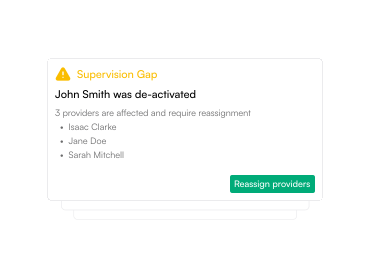
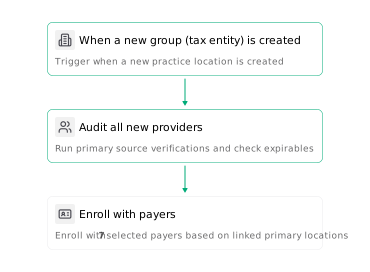
A provider can have an NPI and still need separate Medicare enrollment checks. PECOS-related data helps teams understand whether a provider or organization appears in public Medicare enrollment records, which can affect billing setup, ordering and referring workflows, claim readiness, and provider onboarding.
For provider operations teams, PECOS lookup is often one of the first checks before Medicare billing work moves forward.
Why can’t I find a provider in PECOS?
Can a provider have an NPI but not appear in PECOS?
Does PECOS lookup show ordering and referring eligibility?
Is PECOS lookup the same as logging into PECOS?
Can PECOS lookup confirm a provider is ready to bill Medicare?
Does PECOS lookup show commercial payer enrollment?
Who uses PECOS lookup tools?

Assured Health, Inc.
333 Seventh Ave, Suite 1701
New York, NY 10001