California AB 1041: What Health Plans and Credentialing Delegates Need to Know Before 2027 and 2028

Varun Krishnamurthy
September 28, 2026
Credentialing used to take 60-120 days of manual paperwork. Now, AI handles the heavy lifting, pulling from CAQH, verifying thousands of sources, and filling payer applications automatically. Full provider files are ready in 24 to 48 hours today. Humans step in only where judgment matters, such as in committee review and exceptions.
This guide breaks down what to automate, how to get started, and what to look for in a platform.
A few years ago, credentialing automation meant renewal reminders, document storage, and task assignments in a dashboard. It looked organized, but the work was still manual. Staff were still pulling CAQH data field by field, retyping provider information into payer portals, and calling payers weekly just to check status.
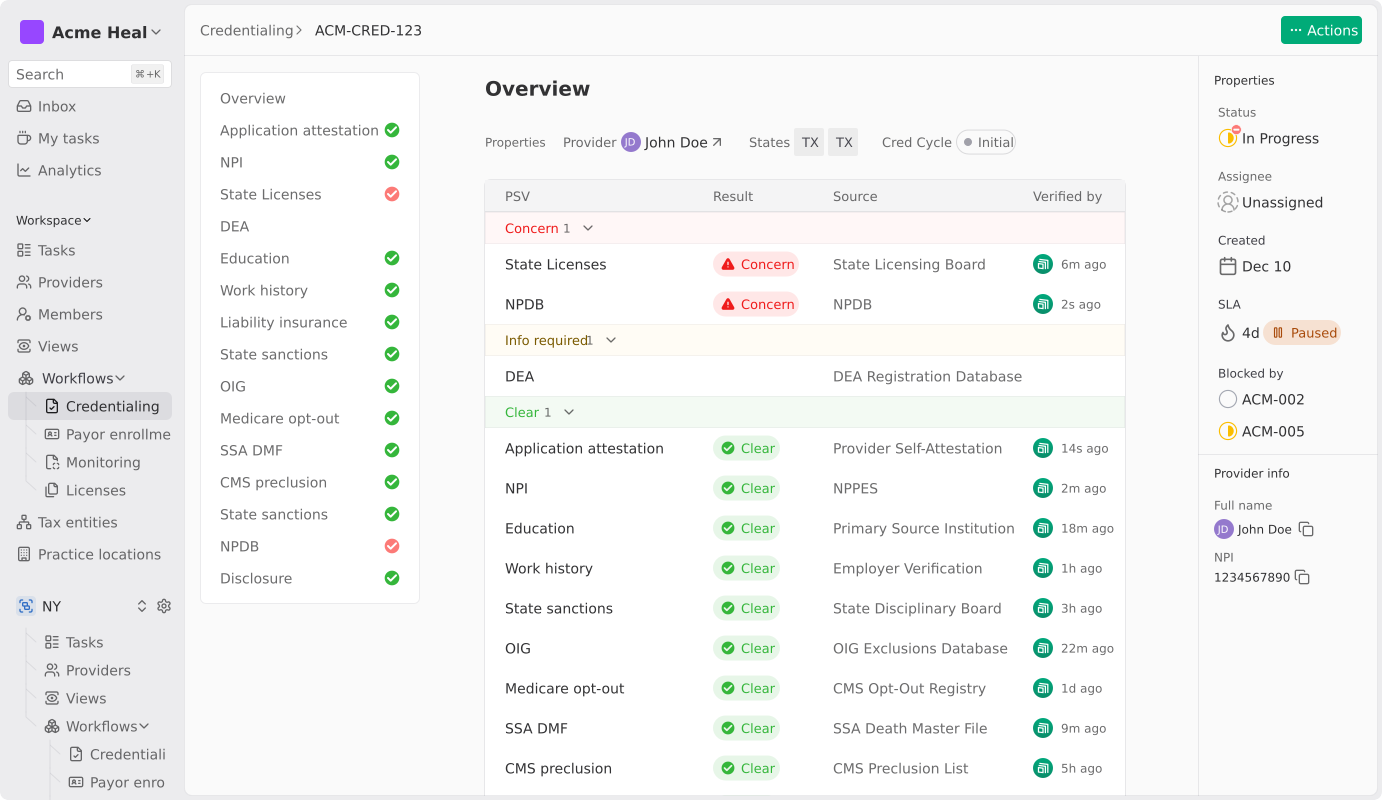
Modern credentialing automation runs differently. AI agents read each payer’s form as it appears, pull provider data straight from CAQH and NPPES, and verify it against 2,000+ sources in parallel. Before any submission goes to the payer, the system checks it for completeness, panel status, and billing code conflicts.
Think of it as three stages -
However, most tools today are stuck in the middle. They look modern, but the actual work still happens by hand. The real question to ask any vendor is, “Does your platform execute the credentialing work, or does it just track it?”
Assured is an AI-native credentialing and payer enrollment platform. Customers include enterprise health systems like Houston Methodist and growth-stage organizations like Tono Health and Prosper Health. As an NCQA-certified CVO across all 11 verification elements, we credential providers in 48 hours instead of the industry-standard 60–120 days. Credentialing, payer enrollment, licensing, and network management all share a single data model, so nothing gets lost between systems.
Credentialing sits at the top of the healthcare revenue funnel. Before a provider can see a patient in network or bill a commercial or government payer, they must be verified against dozens of primary sources, enrolled with each relevant health plan, and licensed in each state where they will practice.
Manual credentialing has consistently taken 60 to 120 days per provider, but for enterprise health systems, this time period is a constraint on revenue, patient access, and expansion planning. Automation compresses the cycle to hours by syncing directly with CAQH and NPPES, running parallel primary source verification across 2,000+ sources, filling payer forms from a single provider record, and catching errors before submission.
Five bottlenecks account for most of the time lost in manual credentialing. They show up consistently, whether you're a small specialty group, a multi-state digital health org, or a large health system.
Getting credentialing documents from providers like CAQH profiles, malpractice certificates, hospital affiliations, and licenses is deceptively slow.
One missing document can stall the entire file for weeks. Now, multiply that across 50 or 200 providers, and what feels like a coordination problem becomes a structural one.
CAQH profiles go stale quietly. Attestations lapse, work history falls out of date, and no one notices until submission. Most organizations treat CAQH as their credentialing foundation, only to discover it's broken at the worst possible moment.
State medical boards, NPDB, OIG, SAM, DEA, education, and work history, each one queried separately, by hand. A single PSV cycle for a single provider can consume several hours of staff time. At scale, it becomes one of the most resource-intensive parts.
Every payer has its own form, portal, and attachment requirements. Mapping provider data to the right field for each one is repetitive, error-prone, and, past 50 providers, simply unscalable.
Once an application is out the door, staff spend hours each week calling payers and navigating hold menus just to get a status update. Closed panel status isn’t always visible at submission, which can extend the cycle by weeks before it surfaces.
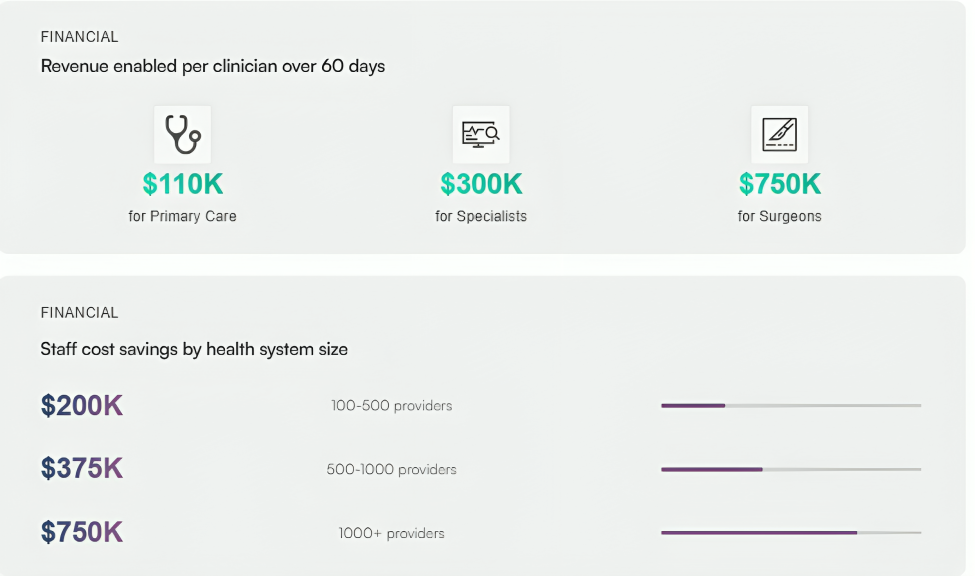
Every one of these bottlenecks has a direct revenue cost. A provider sitting on payroll for 60, 90, or 120 days without billing is a financial drain. For organizations that have lived through slow credentialing cycles, the higher cost is rarely due to the credentialing invoice itself. It is the foregone revenue and delayed patient access that accumulate week after week due to stalled credentialing.
The honest answer is most of it, but not all of it. Here's a step-by-step breakdown with a clear line drawn between what's fully automatable, what's partially automatable, and what still needs a human.
Direct CAQH sync eliminates manual entry. New providers can self-onboard via an invite, or admin teams can upload a roster in bulk. The platform pulls professional IDs, liability insurance, hospital affiliations, NPDB records, and work history with no retyping required.
Parallel queries across 2,000+ sources collapse weeks of work into hours. The AI agent navigates to each source, pulls verification data, captures a timestamped screenshot, and uploads the proof directly to the provider file. Staff reviews and approves; they no longer collect.
This is the single highest-leverage point in the entire workflow. Before anything goes out, the platform checks for missing fields, expired licenses, closed panels, NPI mismatches, and specialty or billing code conflicts.
It's what drives first-pass approval rates above 95%. The cost of a rejected enrollment isn't just the cost of a resubmission; it's additional weeks of provider downtime. Pre-flight validation is where time and money really compound.
AI browser agents dynamically read each payer’s form and map provider data to the correct fields, even as form structures evolve. The same provider data populates applications for Aetna, Cigna, United, Blue Cross, Medicare, and Medicaid without any re-entry.
Where payer portals are available, the platform polls them automatically. Where they aren't, it schedules outbound follow-up. Either way, status updates show up in the dashboard in real time.
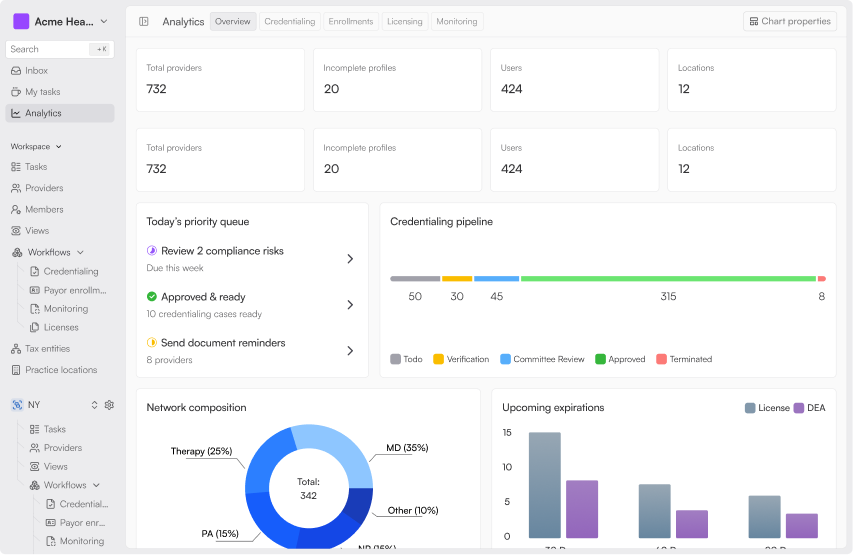
Some checks, such as OIG and SAM exclusion sweeps, are typically run on a monthly cadence to meet payer and NCQA requirements. Others, like state board sanctions, license expirations, and DEA renewals, need to be done in between those sweeps. Continuous monitoring flags sanctions within 24 hours and detects issues 22 days earlier than periodic checks.
Renewals are initiated 60 days before expiration, so no one has to ask.
Automation gets the file ready, verified, flagged, and documented. The credentialing decision itself still belongs to a human.
Closed panels, unusual specialty designations, multi-state license edge cases, audit defense- these need experienced credentialing specialists. This is the 10–15% of the work that automation can't fully eliminate, and it's where having the right team behind the platform matters.
The highest-value automation isn't credentialing alone. It's credentialing and payer enrollment running on a shared data model. Same provider record, same CAQH integration, same monitoring layer. Platforms that only automate verification still leave the hardest part, which is payer enrollment, running by hand.
Before automating anything, document where the hours actually go. What percentage of applications are rejected on first pass? Where do those rejections originate? Which submissions are taking the longest in your current process? Which provider data is most likely to be stale? You can’t automate a process you don’t fully understand yet.
Before any automation goes live, CAQH profiles need to be current and attested. NPIs must be accurate, malpractice and license data centralized, and provider rosters reconciled.
Skipping this step means automation just executes bad data faster. Almost every Assured implementation begins with a CAQH cleanup pass because the foundation is almost always broken.
Decide whether you are solving credentialing in isolation or the full chain of credentialing, licensing, payer enrollment, and monitoring. This decision shapes everything downstream, including which vendor you choose.
Point solutions handle one step well. Full-stack platforms cover the entire provider lifecycle on a single data model. For multi-state or multi-entity organizations, the full lifecycle is almost always the right call.
Start with a controlled subset of ten to twenty providers, 1 or 2 payers, ideally a mix of commercial and Medicare or Medicaid. Validate first-pass approval rates, submission timelines, and platform visibility before expanding. The pilot is where AI-powered claims either hold up or don't.
Set a monitoring cadence, build audit-ready reporting, and define clear escalation paths before you go live. Document the SOPs your team will follow when automation flags an exception. If your organization has delegated credentialing arrangements, confirm the platform's reporting can satisfy those audit requirements, as well.
Most organizations are fully live in 60–90 days. The first two weeks are the pilot, weeks three through six are validation, and rollout follows. If you have delegated credentialing arrangements, budget an extra 30 days for setup.
These mistakes recur across organizations of every size, and most are avoidable with the right evaluation criteria up front.
The vendors who can't answer these questions directly probably shouldn't be shortlisted.
Not all platforms are equal, and the marketing language makes it hard to tell them apart. Use these criteria to decide better.
For complex organizations, the right platform lets the internal team submit rosters and receive approvals, with exception handling and an audit trail running in the background. If the team is doing more than that, the platform is not carrying the load it should.
Assured handles the full provider lifecycle from credentialing, licensing, and payer enrollment to continuous monitoring, all on a single data model.
We credential providers in 48 hours, not 60 - 120 days. First-pass approval rates run above 95%. Customer requests get a response in under 24 hours. And as an NCQA-certified CVO across all 11 verification elements, we meet the highest compliance standard in the category.
Enterprise health systems like Houston Methodist and growth-stage organizations like Tono Health, Prosper Health, and Blossom Health trust Assured to run credentialing and payer enrollment at scale.
See it in action by booking a demo now.
Manual credentialing takes 60-120 days. With AI-native automation, provider files are ready in 24 - 48 hours once documents are collected. Total payer approval still depends on the payer and typically takes 60 - 120 business days, regardless of the platform.
Most of it, yes. Data collection, primary source verification, payer form-fill, submission, and continuous monitoring all run through automation.
Modern platforms manage credentialing across all 50 states from a single provider record, with tax entities, practice locations, and state-specific requirements linked to each provider. The same roster feeds credentialing, licensing, and payer enrollment, so multi-state expansion no longer multiplies the operational load.
Yes, when the platform or its CVO holds NCQA certification. The strongest position is full certification across all 11 verification elements, which covers the complete set of NCQA evaluations and reduces audit friction for delegated credentialing arrangements with health plans.
Less than most teams expect. When automation handles repetitive tasks such as data collection, PSV, form filling, and follow-up, coordinators without deep credentialing expertise can manage up to 100 active providers. Experienced credentialing specialists still own the exception layer, closed-panel decisions, and audit defense.

Assured Health, Inc.
333 Seventh Ave, Suite 1701
New York, NY 10001